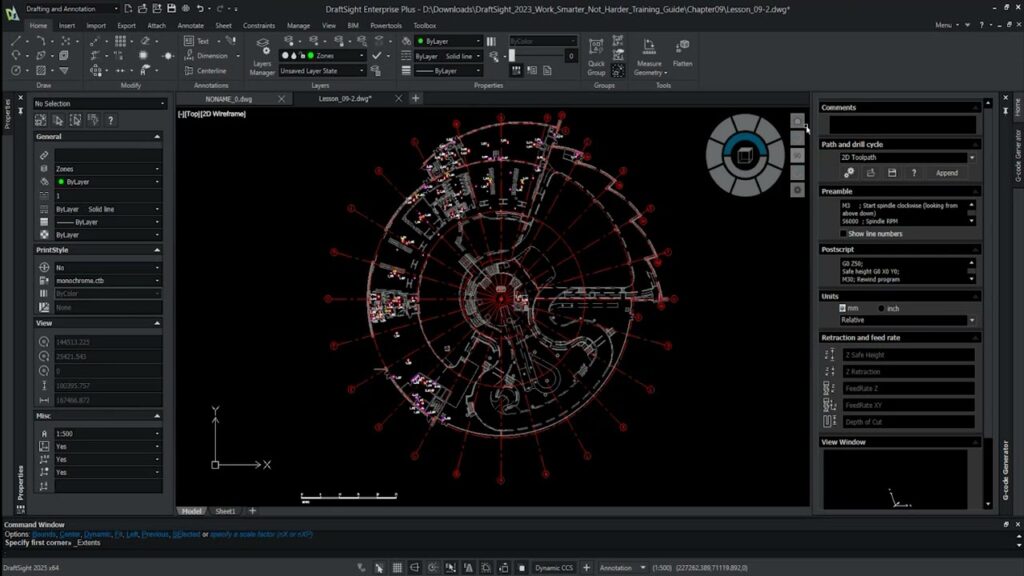
DraftSight gives you the drafting tools your team already knows, at a fraction of the cost. Backed by Dassault Systèmes. Supported locally by SolidCAD.
DraftSight is professional 2D CAD software from Dassault Systèmes — the company behind SOLIDWORKS and CATIA. Create, edit, view, and share DWG files with the speed and precision your work demands.
Whether you’re drafting floor plans, engineering schematics, or mechanical drawings, DraftSight handles it. The interface is immediately familiar to any CAD professional, so your team is productive from day one.
A full-featured platform with advanced drafting tools, batch printing, dynamic blocks, and API support — at a significantly lower cost than legacy subscriptions.
Design, edit, and collaborate with professional-grade CAD software from Dassault Systèmes, backed by local South African support and licensing options that fit your business.
DraftSight delivers the professional drafting tools your team already knows, at a fraction of the cost of traditional CAD subscriptions. See how much your business could save.
Work with a local team that has decades of experience supporting engineering, manufacturing, and design businesses across South Africa.
Get training and implementation support from qualified Application Engineers who understand local industry requirements and workflows.
Enjoy local invoicing and pricing in ZAR, making budgeting simpler and more predictable.
Purchase one-year DraftSight licences online and start working immediately.
Whether you’re creating 2D drawings, managing large engineering teams, or working with advanced mechanical designs, there’s a DraftSight edition built for your needs.
DraftSight offers a user-friendly and budget-friendly 2D CAD solution for beginners, companies, and expert users.
Upgrade to DraftSight Premium for advanced 2D and 3D design capabilities, including parametric constraints for manufacturing and 3D printing.
DraftSight is ideal for large organisations with multiple users or sites.
With Enterprise and Enterprise Plus, you get full technical support, effortless deployment, network licensing, and concurrent usage.
DraftSight Mechanical offers advanced features tailored for updating mechanical drawings in DWG format.
Manage mechanical design tasks efficiently with direct access to DWG data within the software.
Real workflows. Real productivity gains. Real results.
Discover how DraftSight’s familiar command line interface enables a seamless transition without a steep learning curve. Plus, see how native features like multi-dimension automate drawing annotations to save engineering and architectural teams significant drafting time.
Convert multiple PDF drawings into editable 2D CAD entities at once! In this video, the SolidCAD team shows you how to leverage bulk PDF importing in DraftSight to streamline your conversion workflows.
SolidCAD introduces you to the user-friendly DraftSight interface, designed to help new and experienced users navigate, customise, and control their CAD environment with ease. In this video, we walk through the essential interface elements that make DraftSight simple, intuitive, and highly efficient.
Use our Product Selector to compare features, understand licensing options, and quickly identify the edition that best matches your drafting requirements and budget.
Both work natively in DWG and both run your LISP routines. The differences that matter are what you pay, how you licence it, and what support you get. Here’s the short version.